A Comprehensive Guide to Backup Postbox Email

 4.9based on 1207 user reviews
Professional users and large organizations are heavily dependent on role-based or shared mailboxes in terms of finance, support, HR, sales, and the list goes on. Such types of mailboxes come in use for purposes like legal records, confidential conversations, and sustaining attachments. However, the main agenda is to backup Postbox email to safeguard shared email information from complications like cyber threats, risk of compliance, accidental deletion of data, and multiple outages, to guarantee easy accessibility of data among users.
A functional or shared mailbox, which is also known as Postbox Email, is a powerful desktop client, famous for its modern attributes and intuitive interface. Different from users’ personal mailboxes, Postbox emails are considered to be more at risk of data loss due to account misconfigurations, multiple access, or changes in permissions. That is why it is crucial to backup Postbox Emails to keep personal and professional communications completely retrievable, safe, and secure.
In this blog, we will discuss all about the who’s, how’s, and why’s to backup Postbox email, along with a couple of methods and their pros and cons.
Common Use Cases to Download Postbox Emails
- Deactivating Accounts: Sustaining historical emails, contacts, calendars, and other files before closing accounts for legal compliance or audit purposes.
- Migration of Systems: For shifting the entire database consisting of emails to a new operating system.
- Restore Data: Users retrieve data information that was accidentally deleted by the shared user.
- Protection of Data: Shielding essential and confidential information from cyberattacks, malware, and ransomware by operating without internet connection.
Why Do Users Often Backup PostBox Email?
Check out some of the following crucial reasons why users need to export PostBox Email:
- Sharing the same account with multiple users generally increases the chances of complications such as mismanagement, accidental deletion, data loss, and cyberattacks. Backing up crucial data guarantees easy restoration of information without any technical disruption.
- Organizations and professional users like investigators, forensics, and legal authorities backup PostBox emails for compliance, investigation, eDiscovery, and audit purposes.
- Doing so protects users’ data during unforeseen contingencies involving sudden outages, service failures, malware, email infection, and ongoing operations.
- Useful to download PostBox emails while shifting to a brand new platform, whether it’s online or desktop based, sustaining prior records, and backup mailboxes that are no longer in use.
Export PostBox Mail Using Traditional Technique
- Open the PostBox application on your operating system.
- Go to the “Folders” that you wish to backup.
- Choose all the required emails from the folder you have chosen.
- Select “Export” or “Save As” by right-clicking on the files.
- Add a favorable destination path where you want to save your converted files.
- Finally, backup Postbox emails with safety.
Explore the Drawbacks of Using Manual Solutions
- Does not guarantee to preserve the integrity of Postbox data during this process.
- Favorable to download Postbox emails for a small volume of user information.
- There is a high probability of partial backup during the synchronization process.
- Since emails and mailboxes are copied, it can increase the size of the mailbox.
- The performance of any manual process completely depends on the network stability, making it a liability.
- It is not suitable to export Postbox emails in large quantities, resulting in it being time-consuming.
Automation You Can Reply On
We recommend this tool not just based on its utmost reliability and accuracy. Unlike any traditional method, our products have been tried and tested for backup technology. With a free demo version provided, users can checkout the amazing features of the tool and can reach out to us 24/7 around the clock in case of any queries. Trusted by many experts, we guarantee a safe and 100% secure email backup with zero risk.
A Professional Solution to Effortlessly Export Postbox Emails
Although taking assistance from traditional methods can prove to be beneficial, it does not favor to download Postbox emails without a proven software, backing up large volumes of files, metadata preservation, and quick results.
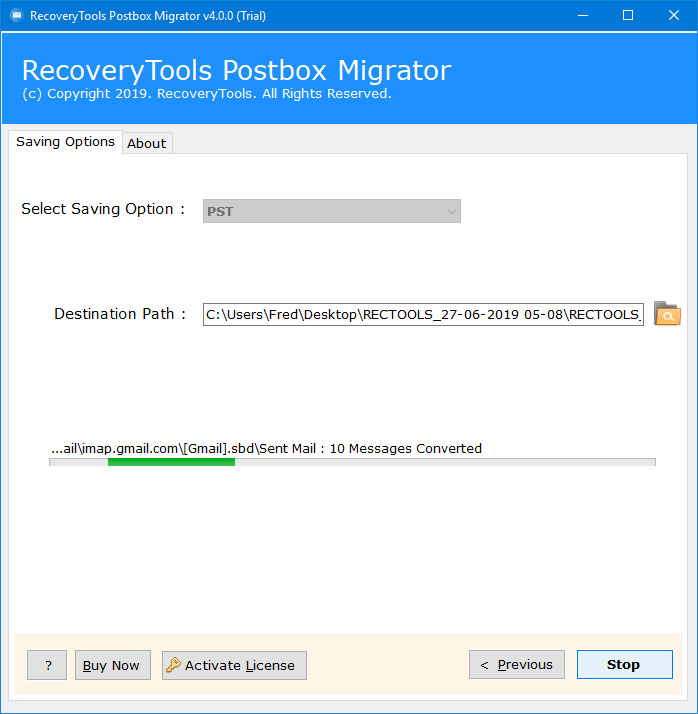
In order to conquer such hurdles, users must go with an automated and proven method like the RecoveryTools Postbox Migrator. Not only is the tool a reliable solution to safely export Postbox emails, but it is also specifically designed for both technical professionals and beginners without even a slight chance of data loss.
Steps to Follow to Backup Postbox Email without Any Hassle
- Install and run the tool on your operating system
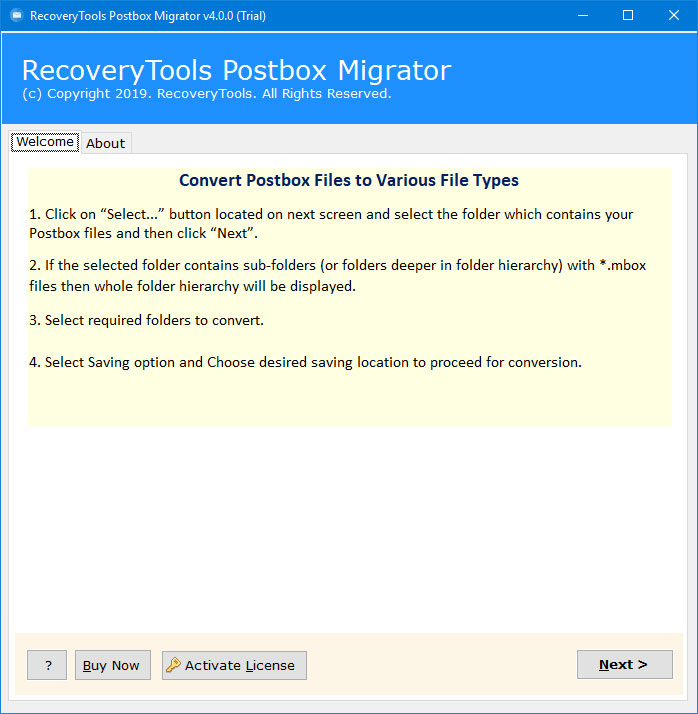
- Enter your “Postbox” Files or Folders
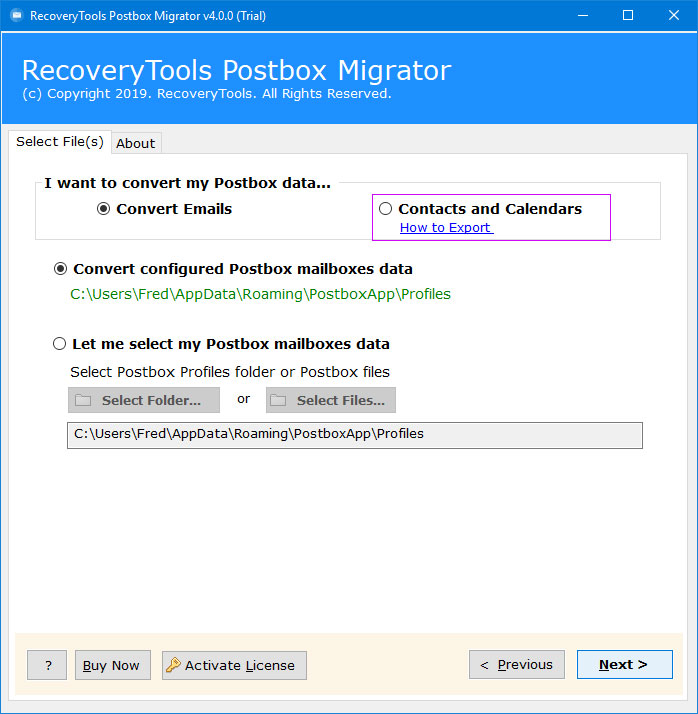
- Select the email or mailboxes you need to backup Postbox mail
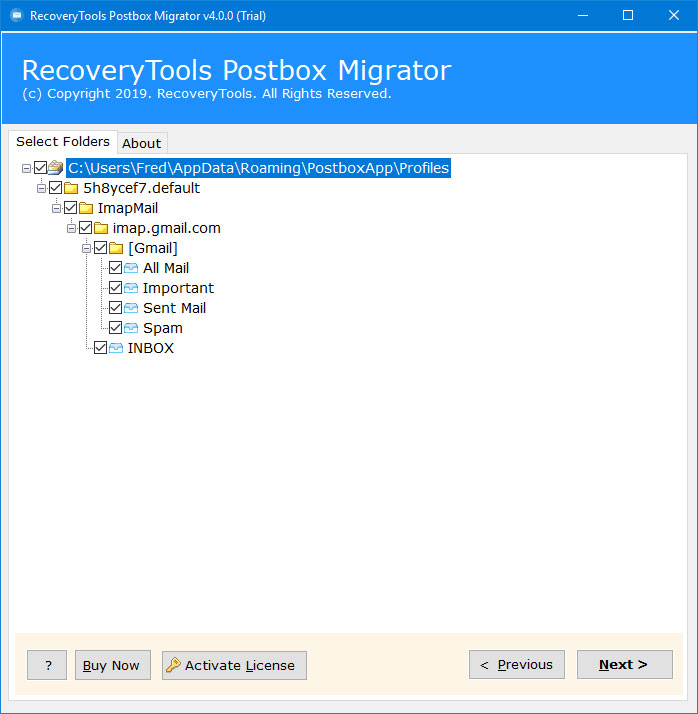
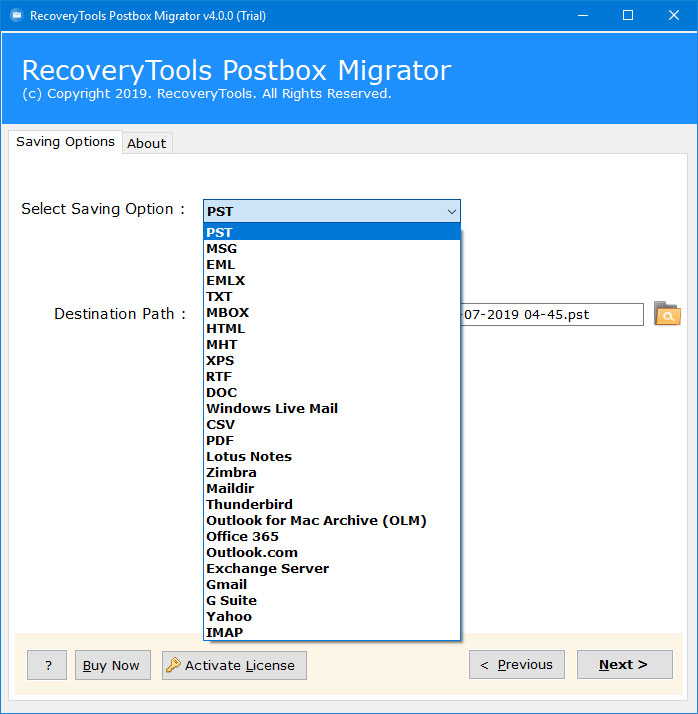
- Choose a preferred saving format and destination path to save those files on your device
- Finally, click “Backup” and for the process completion
Prominent Attributes of the Professional Solution
- With the help of this robust utility, users can avail plenty of saving options, such as it can convert emails to PDF, MSG, MBOX, PST, and the list goes on.
- Easily backup Postbox emails to your hard drive, local drive, computer, or pen drive easily.
- Ensure to migrate all data without any risk of losing crucial data information in the midst of the backup procedure.
- Preserves information like metadata, attachments, and folder hierarchy in the resultant file.
- Through the Advanced Filters option, users can select their data according to many aspects, like date, folder, subject, file types, etc.
- 100% safe and secure, due to the modern algorithm infused while creating the solution.
- Generates a comprehensive report with complete structure and information.
Conclusion
For many businesses and legal organizations, Postbox emails are considered to be crucial in terms of regular communications within the enterprise. Therefore, it is essential to backup Postbox email to secure such informational records for numerous current and upcoming purposes. While manual solutions might be utilized by casual users, it might suffice for professionals since they deal with thousands of emails, contacts, and files constantly which often need to be backed up simultaneously.
To minimize such drawbacks, users must choose a practical solution in order to protect and preserve data information from threats, incomplete synchronization, and missing information. Use the automated solution as it provides a scalable, ideal, and error-free path to backup Postbox email with or without the need for an internet connection.
4.9
based on 1207 user reviews