How to Migrate Gmail to Zoho Mail: The Right Way

 4.9based on 1207 user reviews
Do you want to migrate Gmail to Zoho mail to get a more secure and professional emailing service? Emailing is a very important mode of communication in today’s digital world. Gmail has remained one of the most widely used emailing services for a very long time. But in recent times, people have not only stuck to Gmail but have also looked for more advanced solutions such as better emailing options with higher security and professionalism in order to carry out their business-oriented tasks. Zoho Mail is one such solution.
Through this blog post, you will be able to learn about the step-by-step procedure to transfer Gmail to Zoho mail using both manual and professional methods. Here, you will be able to learn how to migrate Gmail to Zoho mail easily without facing any complexity and easily tackle all the challenges during the process.
Why Transfer Gmail to Zoho Mail?
The need to migrate emails from Gmail to Zoho arises due to the fact that it is an ad-free emailing hosting service site (Google is known to have put up advertisements on this a number of times) and because it is a part of Zoho Workplace. Zoho Workplace is used by a lot of businesses because they require better control over their emailing information.
There can be a variety of reasons why people prefer to import Gmail to Zoho Mail, including cost efficiency, enhanced privacy, and better administrative control.
- Customizable & ad-free email experience
- Security and privacy controls enhanced
- Support for custom domains, professional emails
- Seamless integration with other Zoho business apps
Choosing to move Gmail to Zoho Mail will deliver significant long-term advantages related to data ownership and efficiency for both organizations and professionals.
How to Migrate Gmail to Zoho Mail? Tested Manual Ways
One can transfer Gmail to Zoho mail with the help of IMAP, Email Clients such as Outlook/Thunderbird, or Google Takeout. However, these are not a reliable option. Experts have recommended using a third-party application for Gmail to Zoho Mail migration. Here is a step-by-step solution to convert Gmail to Zoho Mail, explaining different methods to migrate Gmail emails efficiently.
1. Migrate Gmail to Zoho Mail Using IMAP
The technique ties the Gmail account with Zoho Mail utilizing the IMAP server settings.
Steps involved:
- Log in to your Gmail account and allow access via IMAP in the settings.
- Create an application-specific password when two-step verification is turned on.
- Log in to Zoho Mail Admin Console.
- Add Gmail IMAP Server information and settings.
- Create Gmail accounts by adding them manually or by using a CSV file.
- Begin the migration and follow through until completion.
While this approach is effective, it will involve a series of configurations. Therefore, if a wrong configuration is used, migration failures or poor transfer of information can be produced.
2. Use Email Clients such As Outlook Or Thunderbird
This is a completely manual process to migrate Gmail to Zoho mail using an email client.
Steps involved:
- Use your Gmail account with an email client via IMAP.
- Add your Zoho Mail Account to your existing Email Client.
- Enable both accounts to sync.
- Do a manual drag-and-drop transfer of emails or folders from Gmail to Zoho Mail.
- Repeat this process until all the necessary emails have been transferred.
Such an approach can prove to be very time-consuming, especially when dealing with a large mailbox, with a higher possibility of lost or repeating emails.
3. Google Takeout (For Backup Only)
The primary usage of Google Takeout is downloading Gmail data.
Steps involved to migrate Gmail to Zoho mail:
- Log into your Google account and access Google Takeout.
- Click on Gmail in the list of Google products.
- Export the data and download it in MBOX format.
- Save the downloaded file as a backup.
- Other third-party tools can be used if you want to upload this information into Zoho Mail.
This technique is only good for backup and not for migrating emails to Zoho Mail.
Gmail to Zoho Manual Migration Limitations
While the manual process to migrate Gmail to Zoho mail is helpful, but it comes with a variety of limitations.
- Beginner-level users may struggle with the process of setting up and configuring their accounts properly.
- If there are a significant amount of email messages and folders in your Gmail account, the time and effort it will take to migrate these messages to Zoho using the manual method may be great.
- The greatest disadvantage of migrating from Gmail to Zoho using the manual process is the potential for losing data due to the manual nature of the migration process.
- Manual methods do not allow for any filtering options, so all email messages must be migrated from Gmail to Zoho regardless of the sender.
4. Specialized Tool to Migrate Gmail to Zoho Mail
The ultimate utilization of the Email Backup Software is considered migration of all the older messages of Gmail to Zoho without any technical hassle. It allows the transferring of Emails from Gmail to Zoho Mail securely along with attachments and full data integrity. So, there is no need to download one Gmail message at a time and migrate to Zoho. Utilize advanced software that may automatically migrate email from Gmail to Zoho in bulk. Download Today!
Why is the Pro Gmail to Zoho Mail Migration Tool a Better Option?
As far as manual methods are concerned, Gmail to Zoho migrator is a simpler alternative in this regard. Moreover, this tool prevents any loss of data or replication when you migrate Gmail to Zoho mail. The tool is developed to support both technical and non-technical users. Hence, it proves to be a reliable and efficient solution to migrate personal Gmail to Zoho Mail.
Functionalities offered by the advanced tool include:
- Secure migration of emails from Gmail to Zoho Mail
- Conserving emails, attachments, and folders
- Handling sizable mailboxes
- Bulk Migration support
- Risk of loss of and duplication of information
- User-friendly interface for non-technical people
The Gmail to Zoho migration tool is developed in such a way to allow a seamless and step-by-step migration process from the very start until the end.
How to Transfer Gmail to Zoho Mail with a Pro Tool?
To state it simply, Gmail to Zoho Mail migration tool removes complexity when migrating with a few simple steps. Here are the step by step process to migrate Gmail to Zoho mail using the professional tool:
- Install Gmail to Zoho Mail migration tool on your computer. After completing the setup process, launch the application to begin.
- Of these options, you need to pick Gmail as your personal choice of emailing service and safely login to your account.

- Select the folders or use filter options to migrate Gmail to Zoho with specific emails.

- Select IMAP as the from the saving option and enter your Zoho Mail login details along with server details in the corresponding fields in order to establish a connection with Zoho Mail.
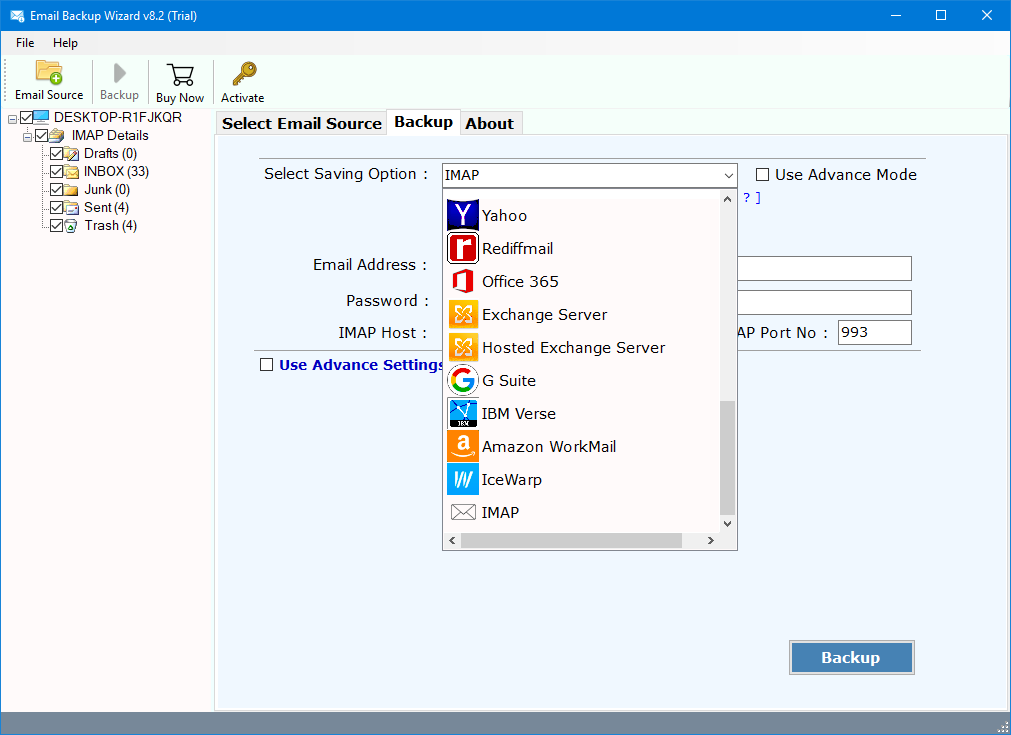
- Begin the migration process. The tool will automatically transfer your emails from your Gmail accounts to Zoho Mail without any losses in data or organization.

What Happens After You Migrate Gmail to Zoho Mail?
A number of post-migration tasks must be accomplished after Gmail to Zoho Mail migration.
- Update MX Records
Update your domain’s MX records to start receiving all your new emails in Zoho Mail, rather than in your Gmail inbox. - Migrated Emails Verification
Log in with Zoho Mail and check if all emails, folders, and attachments have successfully migrated. - Notifications to Users
In case you are moving your Gmail accounts to Zoho Mail for your organization, you need to inform your team about new login information and usage details.
Gmail to Zoho Mail Migration Best Practices
Adopt these guidelines in order to have a seamless experience with the Gmail to Zoho Mail migration tool:
- Conduct a Test Migration Before Migrating All Mailboxes
- Free up storage space in Zoho Mail
- Migrate during non-working hours as much as possible to avoid disruptions
- Use Gmail until migration is completely proven
Such methods reduce downtimes and errors associated with migration.
Common Challenges and How the Professional Tool Helps
Manual Gmail to Zoho migrations may face some challenges in the following areas. However the tool can help you to overcome these limitations:
- Duplicate Emails
Gmail can be a bit duplicate-causing with labels. Gmail to Zoho Mail migration tool efficiently manages the folder structure to reduce this issue. - Authentication Issues
This software supports app‑specific passwords and other forms of secure login, thus limiting authentication errors. - Large Mailboxes
Gmail to Zoho Mail migration tool is designed in such a way that it supports huge sizes of mailboxes without compromising on the performance of the operation.
FAQs: Gmail to Zoho Migration
Q1: How is Zoho Mail better than Gmail?
Though there are a lot of comparable features like storage space, data safety, interface, and display ads. But they are both equally good. Gmail has the trust of users and more storage of 15 GB. Though Zoho has mail, which has better security and no ads, it has only 5GB storage space and is relatively new.
Q2: How to migrate data from Gmail to Zoho mail?
You can migrate Gmail to Zoho mail by using:
Zoho Mail Exchange Migration Tool: In PST and EML format
Zoho Web Login Panel: In EML format, go to Settings >> Import/ Export >> Import Email >> Browse the files and Import.
Q3: Why are users leaving Gmail for Zoho?
People consider switching from Gmail to Zoho Mail because it is ad-free, more secure, and offers a simple, distraction-free interface for everyday use, while also providing further features for professional purposes. It has popularity in India, which was also promoted by the home minister, and is an integrated India email service provider.
Final Thought
The process to migrate Gmail to Zoho mail is a highly strategic move for those people who are searching for a safe and professional emailing service. Although various methods can be used for migrating, using Gmail to Zoho Mail migration tool might prove to be quite reliable and efficient in this case.
Gmail to Zoho Mail migration tool removes all complexity and ensures complete accuracy of information during the whole migration process. As far as this tool is concerned, there is no migration of an account whatsoever, or a bunch of accounts with which an individual or a business is dealing. It can simply transfer Gmail to Zoho mail. With proper planning and your tool in hand, your migration to Zoho Mail will go smoothly without any hassle.
4.9
based on 1207 user reviews