How to Import Zoho Mail to Outlook in Just Few Steps?

 4.9based on 1207 user reviews

In this guide, you’ll find a reliable expert-tested approach to import Zoho Mail to Outlook with full security and no data loss. This article covers manual as well as automated solution with proper step-by-step guide to ensure users don’t face any hurdle while performing the migration. Read this article till the end to easily transfer emails from Zoho Mail to Outlook.
Why Import Zoho Mail to Outlook?
Before jumping straight to the methods it is recommended to read reasons why users prefer to migrate from Zoho to Outlook. Some of the major ones are mentioned below:
- Exporting emails from Zoho to Outlook provides users better compatibility with Teams, SharePoint and Exchange Online services.
- Outlook allows users to access and read emails without an internet connection which is not fully supported by Zoho Mail interface.
- Microsoft Outlook is a powerful desktop email client that supports fast performance speed and enhanced functionality as compared to Zoho Mail.
- Importing Zoho Mail to Outlook stores all emails in PST format which can be further shared to multiple email clients.
- Many users use multiple accounts. Outlook allows them to manage all their Gmail, Yahoo, IMAP and more accounts at one place in one dashboard for seamless workflow.
Also Read: Migrate Zoho Mail to Gmail
How to Transfer Emails from Zoho Mail to Outlook? Manual Way
To import Zoho Mail to Outlook, the only way is to configure your Zoho account as an IMAP account. Once you configure your account, Outlook will automatically download all of your Zoho Mail messages in PST format.
- Open Microsoft Outlook.
- Click the File menu, then select Add Account.
- Enter your Zoho Email Address and then click the Connect button.
- When asked, enter the Zoho app password.
- Outlook will self detect the IMAP settings and start configuring your Zoho account.
- After completion of the synchronization process, your Zoho emails will be downloaded in the PST format.
Limitations of the Manual Method
- Time-consuming process if you have large mailboxes.
- You can’t directly export from Zoho to Outlook PST.
- An internet connection needs to be available and stable for the full import of the emails from Zoho to the Outlook account.
- If you are not technically proficient, you could easily make a mistake and interrupt the import process resulting in errors.
- The import may not preserve the original folder structure of emails which increases the chances of data loss.
Verified Solution to Export Zoho Mail to Outlook
Email Backup Tool is a professional trusted tool to import Zoho Mail to Outlook. The utility offers a number of features that makes it easy to transfer email from Zoho to Outlook. The Zoho to PST migration tool has a simple user layout that makes it easy for beginner users to migrate Zoho to Outlook. Additionally, it does not require installation of any external application to add Zoho Mail to Outlook. So, download the efficient tool to backup Zoho Mail to Outlook PST format and simplify your email migration process.
How to Import Zoho Mail to Outlook Directly?
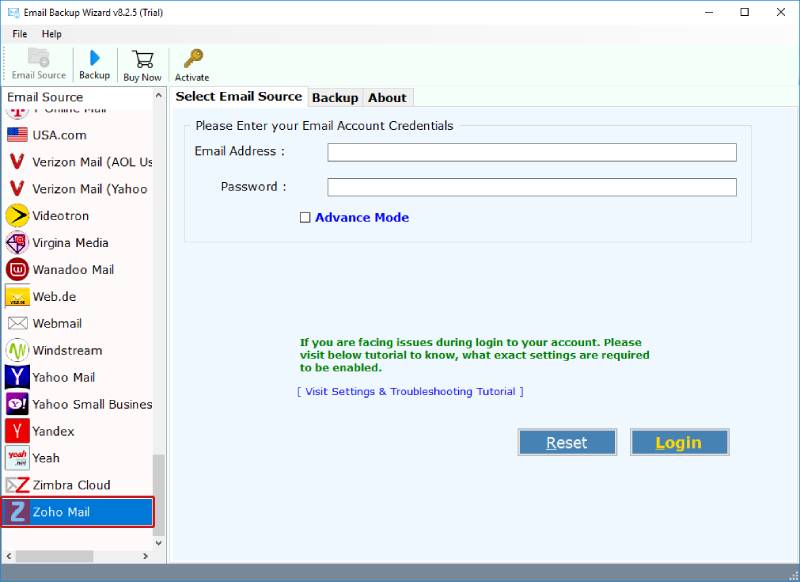
1. Firstly, download, run and install the tool to add Zoho Mail to Outlook. Choose the email source as Zoho Mail from the left panel.
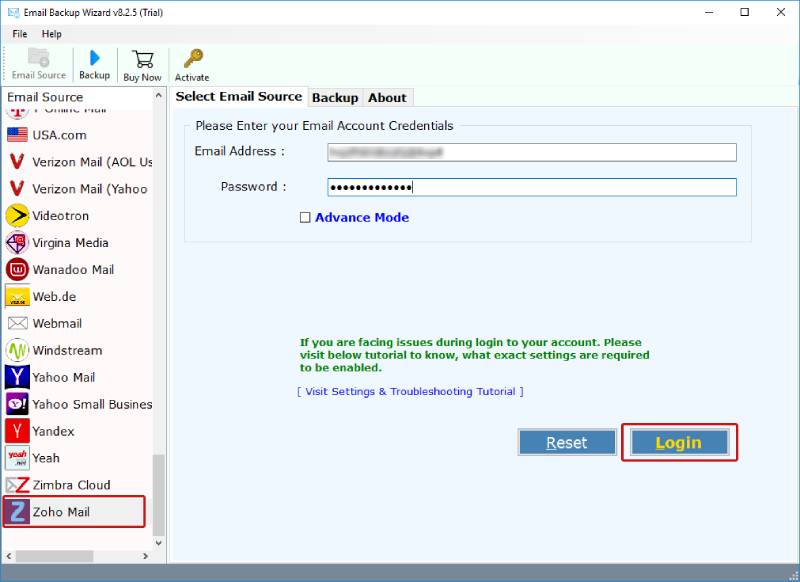
2. Now, enter the login credentials of your Zoho Mail account and click on Login to connect.
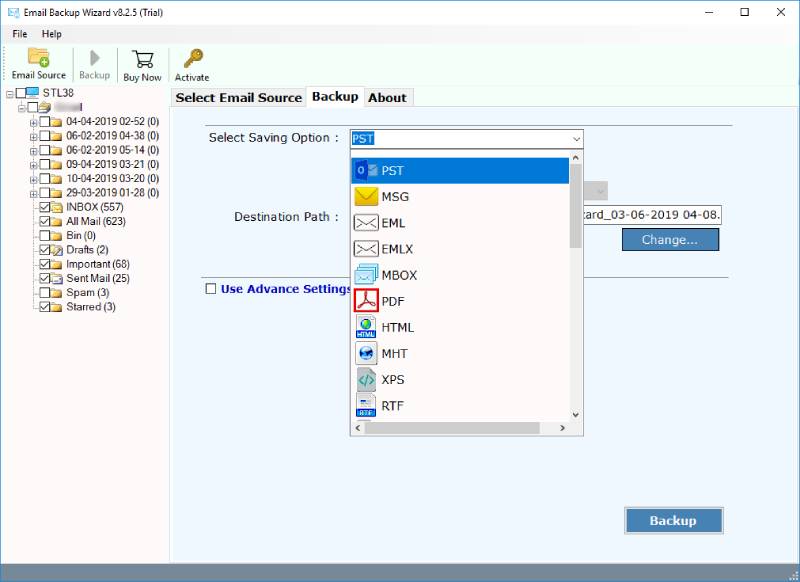
3. Choose the files or folders that you want to export. Now, select the file saving option as PST to transfer emails from Zoho to Outlook.
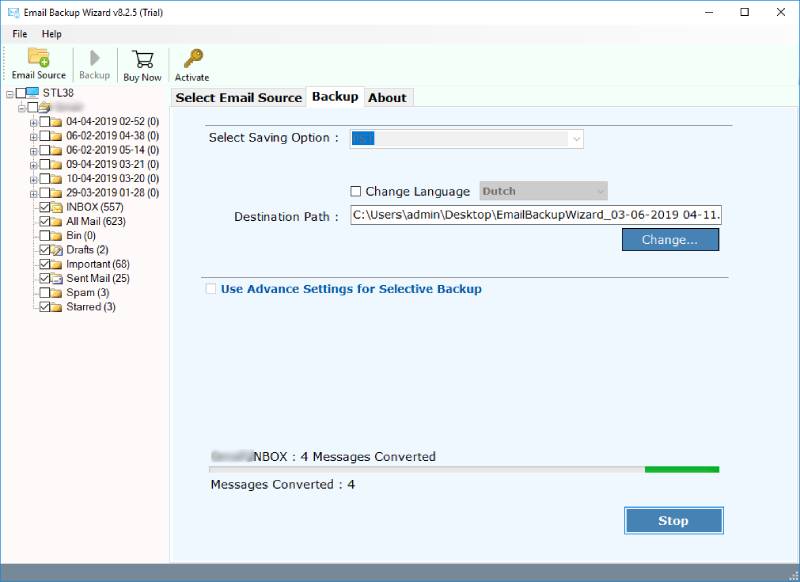
4. Select the destination path along with other required options and click on Backup. Here, the process to import contacts from Zoho to Outlook will start.
Key Features of Zoho Mail to PST Migration Tool
- Download unlimited Zoho Mail files to Outlook at once easily.
- Import Zoho emails to PST along with all the attachments.
- No need to install Outlook application for the migration process.
- This software to export Zoho Mail to Outlook is compatible with every Windows OS editions.
- Zoho Mail to Outlook backup tool support very simple user interface.
- You can select the output location as per your need to easily access the files.
Final Words
Hence, manually migrating Zoho to Outlook can be a slow and technical procedure. For a fast and secure import Zoho Mail to Outlook process, use the automated solution mentioned in the article. It will preserve folder structure, emails and their attachments in the original form. Choose the right way as per your requirements. If you face any difficulty related to the software, feel free to contact our support team anytime.
Also Read: Top Zoho Mail Backup Solution
4.9
based on 1207 user reviews