Why is My Gmail Storage Full After Deleting Everything?

 4.9based on 1207 user reviews
Many people find themselves wondering, “Why is my Gmail storage full after deleting everything?” This is a common but painful issue users are facing nowadays that they delete everything from their Gmail but still sees that it’s full. This error affects user’s daily productivity and poses several challenges. In this article we are here to solve this problem. We will understand why Gmail storage is showing full even after deleting emails, and how to easily resolve it even without deleting Gmail emails. Keep reading the article to find out the most effective tips and tricks.
However, as we all know, Google offers only 15GB of free storage, which is generally enough, and even if it falls short, people can continue by deleting irrelevant emails. The problem comes when even after trashing everything in Gmail you still facing the storage issues and are not able to send or receive emails.
In this blog, we’ll explain why Gmail storage is full after deleting everything, and to resolve it we will also discuss 4 Effective Methods, including manual fixes and the automated solution that can helps you to free up Gmail space without deleting anything.
Why is My Gmail Storage Full After Deleting Everything?
Before we talk about solutions to fix Gmail storage showing full even after deleting emails, let us understand why is my Gmail storage full after deleting everything?
As mentioned earlier, Google has limited free cloud storage to only 15 GB, which is also collectively shared among:
| Platform | What It Stores |
| Gmail | Emails: Trash, attachments, Spam |
| Google Drive | Docs, PDFs, ZIP files, backups (even shared files consume space) |
| Google Photos | Photos/videos |
So even if you delete emails, the storage might still be full because:
- Trash & Spam folders still have data (It often stays up to 30 days).
- Gmail is not occupying major space; it’s Google Drive or Photos that uses majority space.
- Sent emails and large attachments weren’t deleted – People generally only clear Inbox.
- There might be some hidden attachments or filters in your Gmail account.
- You might not have updated your Gmail storage which is why your Gmail storage is showing full even after deleting everything.
Note: Users believe that deleting a lot of emails will make enough space in Gmail, but it only frees up a few MBs or at max a couple of GBs. Due to this issue of “why is my Gmail storage full after deleting everything” people often miss important emails including invoices, receipts, project files and even admission letters because Gmail remains full even after deleting everything in mail.
How to Fix Gmail Storage Showing Full Even After Deleting Emails Error? – 4 Methods
In this blog, we will learn about 4 Effective ways to fix Gmail storage full after deleting everything issue.
So lets with most basic ways and will eventually move on to better and effective method to permanently resolve the issue:
Method 1: Manually Empty Gmail Trash & Spam
This method will also be useful as it allows you resolve the issue of Gmail storage showing full even after deleting emails from your mobile (Android or iPhone)
- Launch Gmail (either on phone or desktop) > Tap the three horizontal lines (in the top-left corner) >> Look for “Bin” and tap on it
- Select all the folders and click “Delete Forever“
- Do the same for the Spam folder – just above the Bin
Note: Items stay in the bin for 30 days unless deleted manually. After 30 days it automatically gets deleted.
Method 2: Use Filters to Find and Delete Large Emails
- Open Gmail > Type: larger:10M This is a Gmail search option
(This particular option allows you to delete whose size is larger than 10MB. This can be changed as per the need) - Select unwanted files>> Delete >> Again “Empty Bin“
Note: To prevent future space wastage, one can take the time to unsubscribe from promotional emails and newsletters.
If you have followed the above steps and still find yourself with Gmail storage full after deleting everything, Method 3 will prove quite effective.
Method 3: Check Google Drive & Google Photos
This is an efficient method to clean up Gmail storage to free up the space as you can exactly identify what’s taking up space.
- Open Google Drive > Go to “Storage”
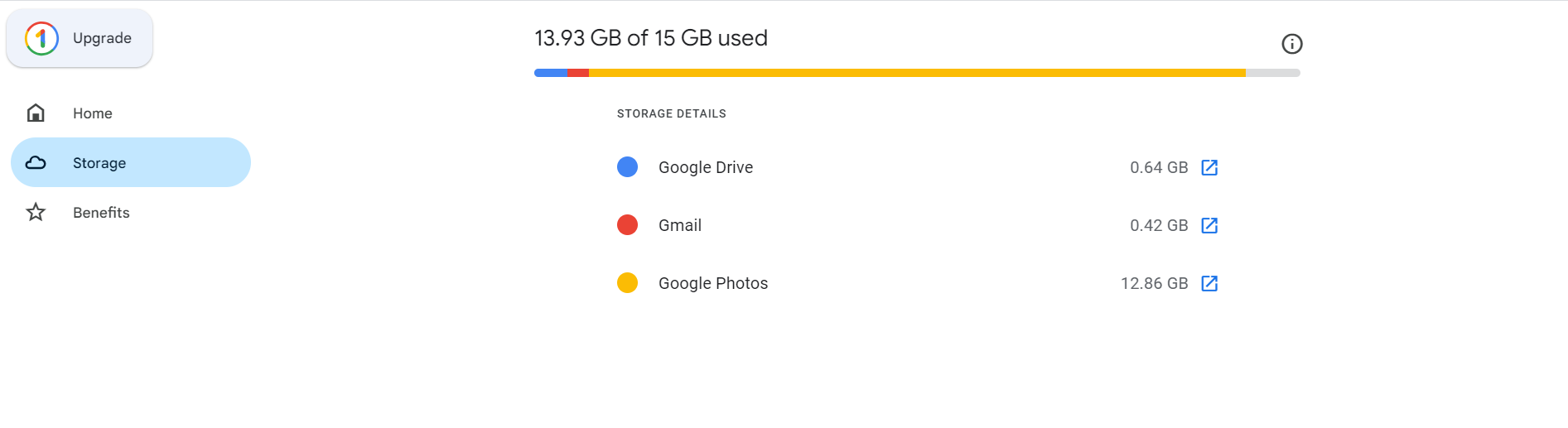
- Click on Clean Up Space > You can now access “Google One Storage Manager”
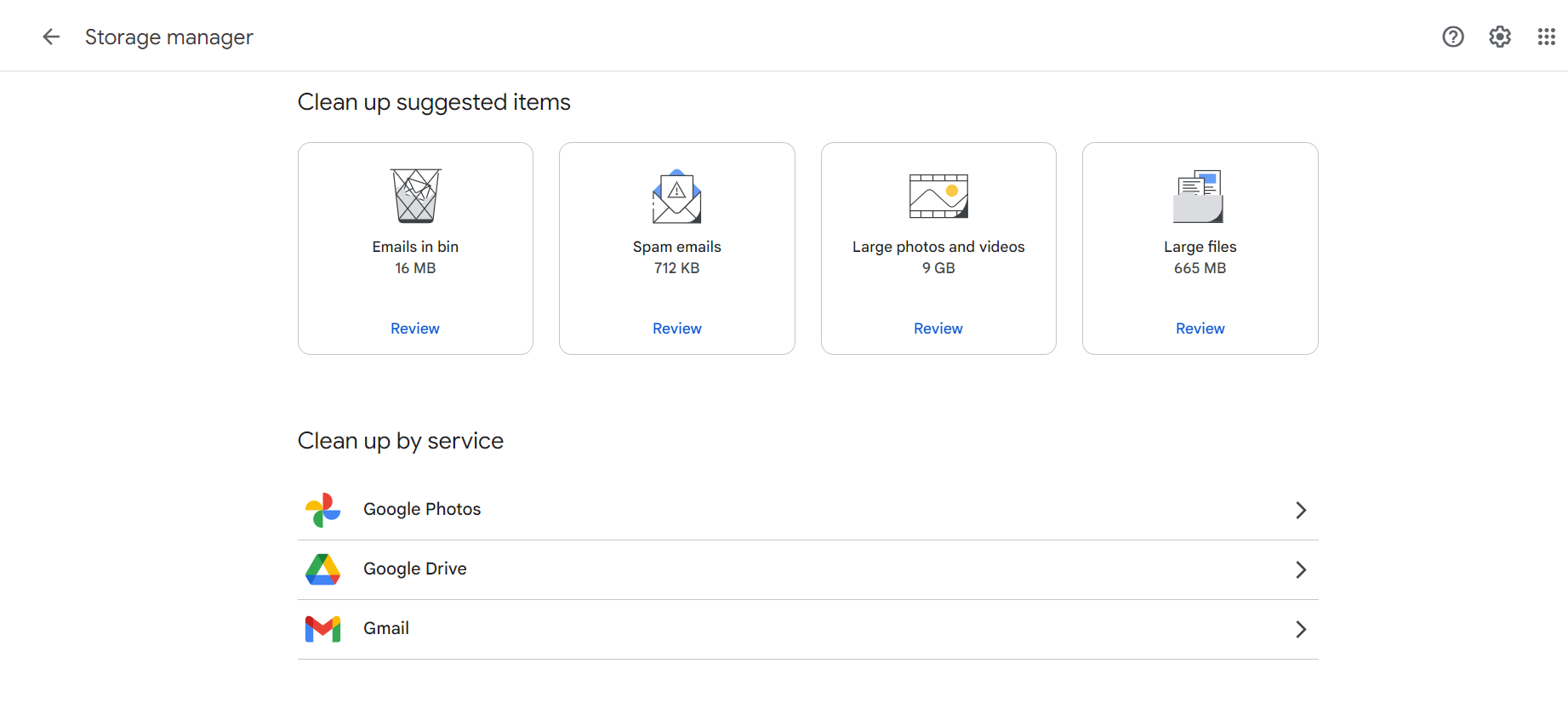
- Look for “Clean up Suggested Items“.
- Review and delete Large Files.
- In Google One Storage Manager you can see Clean Up by Service > Enter each service (Google Photos, Mail to clear all )
Note: In this please check for bin and step as in Method 1 to fix Gmail storage full after deleting emails.
Method 4: Wait for Gmail Storage to Update
After deleting everything from Gmail, you should wait for it to update as Google account takes time to update the storage. However, if none of the manual methods work and if you still want to fix Gmail storage full after deleting everything problem, then contact Gmail support team and get help.
Pro Tip: Get Advanced Way to Free Up Gmail Storage Without Deleting Anything
This is a more professional solution as it allows you to keep all your important documents while catering to the issue of “Gmail storage full after deleting everything”.
Here’s how to free up Gmail storage without deleting anything:
- Download old emails from Gmail with the attachments to and then delete all of them from Gmail.
- Move Gmail folders to another Gmail account and completely empty the one in use.
- You and also transfer old data to a hard drive.
This process although can be done manually, is technically complex. And while the use of Google Takeout can help with the task of freeing up space and storing in personal device, it takes a lot of time and often fails to complete. Moreover, it proves inefficient for when you wish to move directly to another account and free up space without deleting anything. Additionally, Google takeout can only export in the .MBOX format, which can not be directly accessed.
This is where the use of an automated tool – Email Backup Software, proves effective as it is secure, easy to use, and offers you various different formats of backing up or migrating, hence helping cater to your query in a proficient way.
This method comes in handy when you don’t want to compromise with emails anymore without losing the earlier ones.
How to Fix Gmail Storage Full After Deleting Emails Issues? Easy Steps
- Launch the software on your desktop (Software works on both Mac and PC. A free trial version is also available.)
- Select “Gmail” from the Email Source Panel (on the left).

- Enter credentials or you can even use google oAuth Authentication to “Sign in with Google“.
- Select the desired folder you want to transfer. (Panel on the left side of the screen).

Suggestion : Keep the Trash and Spam un-selected. - Select the saving option. If you want to save to PC use PST Format >> Hit Backup.

(Other formats like ZIP, EML, MBOX etc. are also available) - You can also create a new email ID and migrate data there.
- To do so Select Gmail as the Saving Option >> Enter the credentials of another Gmail >> Hit Backup

Your data will saved in a while and fix Gmail storage full after deleting everything.
Now you can empty the whole Gmail without any issue.
Note: With this approach, you won’t lose a single important document or receipt.
Key Benefits of This Professional Solution:
- Allows you to empty up space without deleting important Files.
- It is a more long lasting solution.
- Only method to preserve attachments, metadata, and folder structure.
- Enables you to save data in multiple formats like PST, EML, PDF etc.
- Allows you to preserve Gmail email from Specific Folders, Date Ranges & File Types using advanced filter.
Final Thoughts
So if you have ever wondered why is my Gmail storage full after deleting everything, now you must have understood what’s the issue. It’s not just your inbox, it can be your shared, your Google Drive/ Photos. This issue often creates issues for users hence we have discussed effective solutions.
We suggest using the reliable recommended tool as it allows you to clear Gmail storage without deleting anything. It is a secure, quick and most professional way to delete those emails without losing them and clearing up space so you don’t miss any important email.
Also Read: What To Do If Google Says I Am Out of Storage?
FAQs : Gmail Storage is Full After Deleting Everything
Q1. Why is my Gmail storage full even after deleting everything?
To fix Gmail storage full after deleting everything, clear Trash and Spam from Gmail. Make sure you also clear Google Drive & Photos. You can even transfer files to external storage via professional tool.
Q2. Why is my Gmail telling me I have full storage?
Google only offers 15GB of cloud storage shared across Drive, Gmail, and Photos for a free Gmail email address. To solve this you can delete all the unnecessary files.
Q3. What is the fastest way to clean up Gmail storage?
You can use filters to delete all the large files. Users can also go to the Google One Storage Manager to find cleanup suggestions.
Q4. How to retrieve Gmail when storage is full?
Transfer emails and access them offline or transfer them to another account using the recommended tool.
4.9
based on 1207 user reviews