How to Transfer Emails from Yahoo to Gmail?

 4.9based on 1207 user reviews

Know how you can transfer emails from Yahoo to Gmail account including all attachments and email components. Follow the step-by-step guide and use the method described in the article to perform yahoo mail to Gmail migration in bulk, properly and securely.
In our daily life, email services do a great job. There are lots of email services available such as Yahoo Mail, Gmail, etc. So, almost every user asks a question that which is the best email provider and why to transfer emails from Yahoo to Gmail. Yahoo and Gmail are both the most popular email client services. Gmail gives you the opportunity and it also helps you to access your email service anytime.
Switching from Yahoo to Gmail is more than a preferred changes. It is a full mailbox migration that includes emails, attachments, folder structure, and contacts. Many users search for quickest way to export emails from yahoo to Gmail, and this is the article which gives you exactly what you need. Hence, follow the step-by-step instructions, and a clear comparison of free vs. professional approaches.
It provides unlimited storage capacity and has several things to explore in it. Gmail is more secure as when you use it with a different IP Address then it requires you to verify your identity. Due to this, people decide to transfer emails from Yahoo to Gmail very often. In this article, we have explained a direct and simple solution to convert Yahoo Mail to Gmail very efficiently.
Know what to do if Yahoo Mail Print Button Not Working
Reasons to Transfer Emails from Yahoo to Gmail
The following are the main causes to forward Emails from Yahoo to Gmail:
- Helps to integrate with Google Meet, Drive, and Calendar.
- It has plenty of space capacity so the users don’t have to bother with space issues.
- User-friendly interface with customizable email management options.
- Advanced spam filtering to block unwanted emails and enhance security.
- Powerful search function for quick access to emails, even in large archives.
Also Read: How to Extract Email Addresses from Yahoo Mail?
Manual Method to Transfer Emails From Yahoo to Gmail
- First, open your Gmail account on your device and go to Settings by clicking on the gear icon.
- Next, click on the ‘Accounts and Import’ tab, which is in the middle of the settings page.
- Then, select ‘Import mail and contacts.‘
- A window will pop up; enter your Yahoo email address and click ‘Next.’
- You’ll see a prompt from Shuttle Cloud asking if you want to migrate your emails from Yahoo to Gmail. Click ‘Agree‘ to forward emails from Yahoo to Gmail.
- Finally, choose what you’d like to transfer, such as emails and contacts, and click ‘Start‘ to begin the process.
Also Read: How to Import Gmail emails to Office 365?
Limitations of the Manual Methods:
- Migrating bulk emails can take days or even weeks.
- You can’t migrate multiple Yahoo emails to Gmail at once.
- Only technical users can handle this manual migration method.
- Human errors are common during the process.
- There’s no guarantee of data security during Yahoo to Gmail migration.
Fix: Yahoo emails disappeared from inbox
Configuring Yahoo IMAP Settings Before You Begin
Yahoo Mail uses IMAP for third-party access. Before initiating Gmail’s import tool, make sure IMAP is enabled in your Yahoo Mail settings and that you have generated an App Password. Here are the correct Yahoo IMAP settings to ensure the connection works:
- Incoming Mail Server: imap.mail.yahoo.com
- Port: 993
- Encryption: SSL/TLS
- Outgoing Mail Server: smtp.mail.yahoo.com
- SMTP Port: 465 or 587
- Authentication Required: Yes
Best Solution to Transfer Emails from Yahoo Mail to Gmail in Bulk
The Email Backup Software is a professional approach to import emails from Yahoo to Gmail. With this utility, any user can migrate Yahoo Mail to Gmail without any external help. You can import Yahoo Mail to Gmail effortlessly by following just a few simple steps. Firstly, download the Yahoo to Gmail tool.
Use the safest tool for Yahoo mail to Gmail migration without losing any information. It is a Windows-based utility that does not require any supporting application for the migration. With this tool, you can easily transfer emails from Yahoo to Gmail with attachments. The Yahoo to Gmail tool is completely free from any type of risk.
How to Export Emails from Yahoo to Gmail?
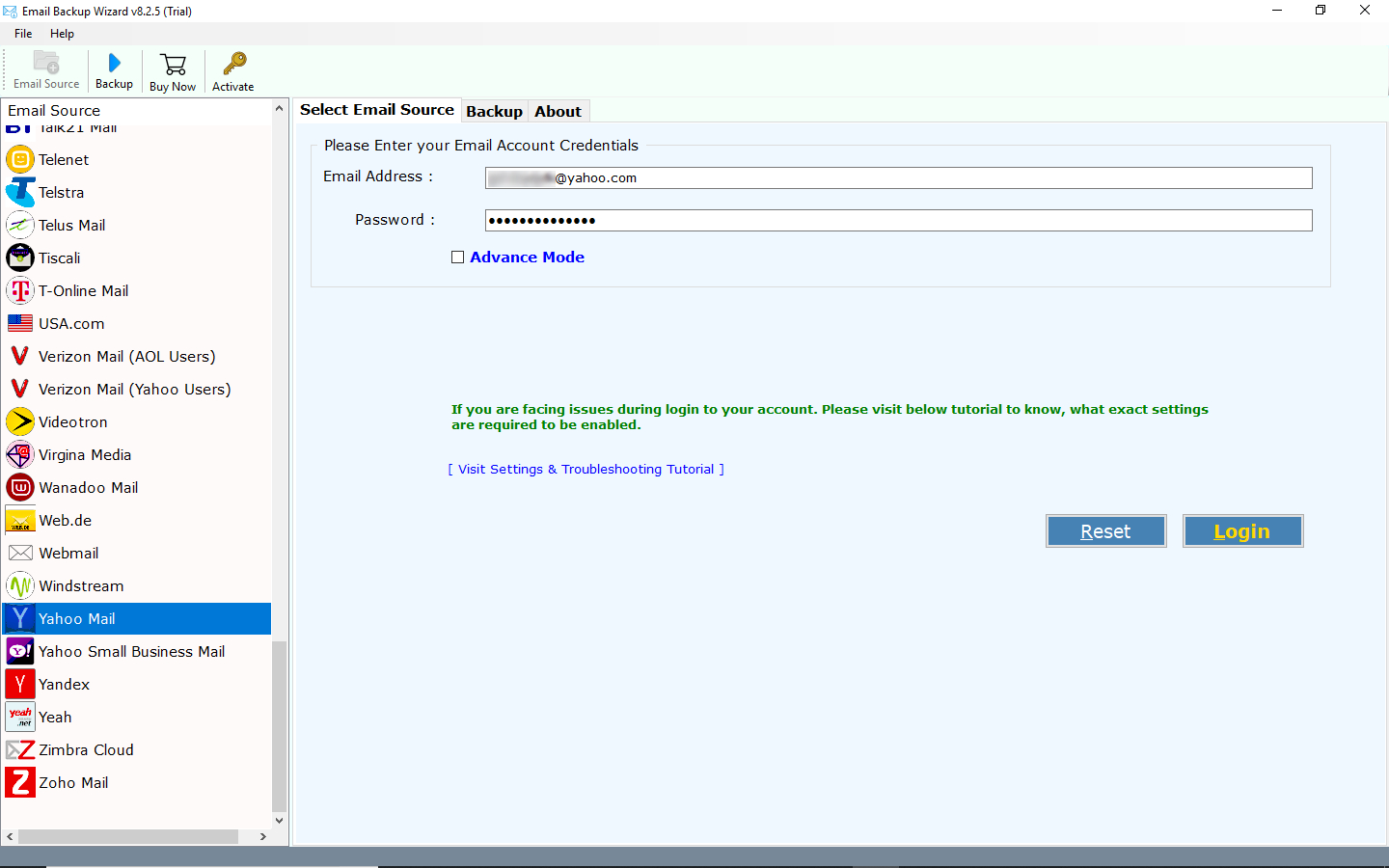
- Firstly, run Yahoo to Gmail migration tool and select Yahoo from the list of email sources. Enter the Yahoo Mail credentials and click on the Login button.
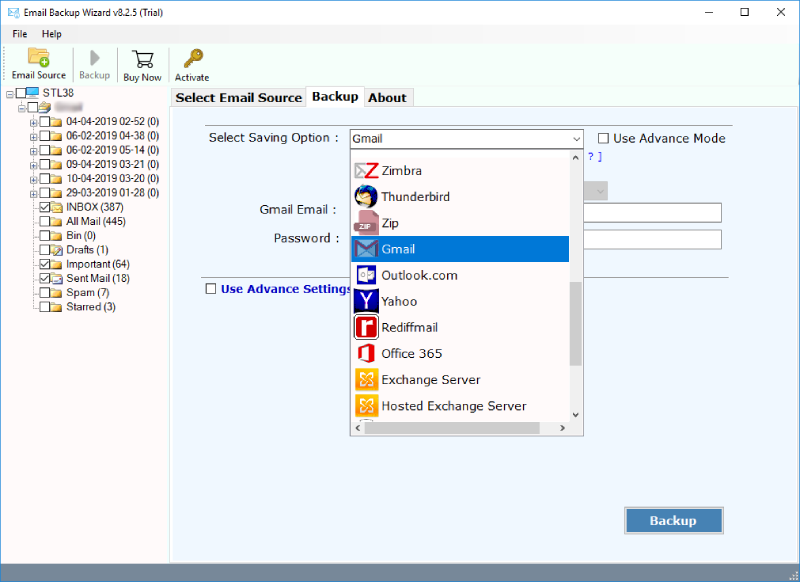
- Now, choose the email folders for Yahoo to Gmail migration. Select Gmail as the file-saving option.
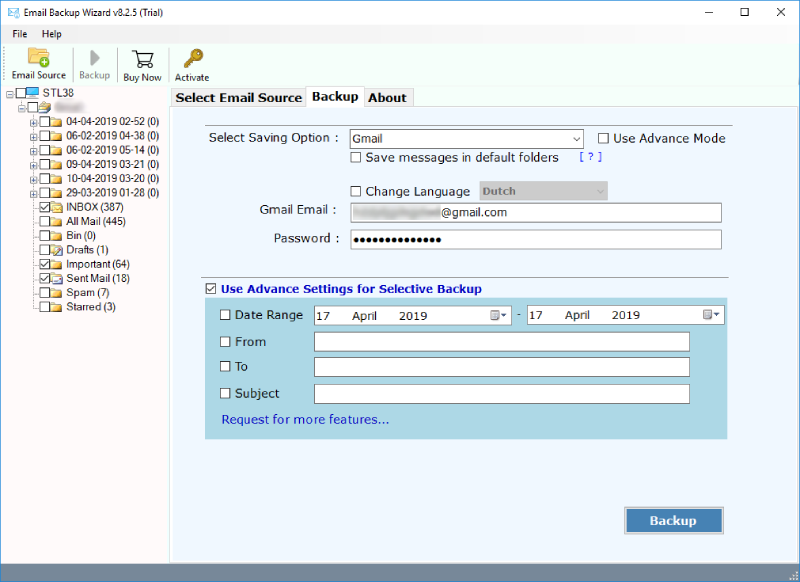
- Now, enter the login credentials of your Gmail account to export emails from Yahoo to Gmail.
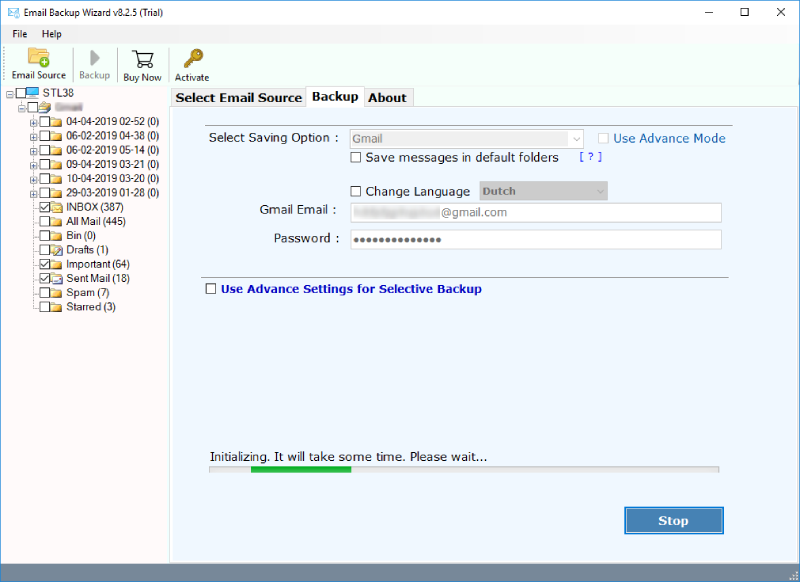
- At last, click on the Backup button to begin the Yahoo Mail to Gmail backup process easily.
Yahoo vs Gmail: Forward Emails from Yahoo to Gmail
See how you can improve email management if you transfer emails from Yahoo to Gmail by understanding the differences between these two services. You can complete the process of Yahoo mail to Gmail migration easily by learning the difference in both the platforms.
- Google and Yahoo offer Gmail offers Yahoo Mail.
- Google is rather a very big company that owns a lot of sites and Yahoo is smaller compared to Google.
- Gmail can be used with Google Docs, YouTube, etc., and Yahoo Mail with Yahoo Messages, Flicker, etc.
- The Gmail spam feature is more powerful than the Yahoo spam filter.
- Gmail provides free-of-cost POP access and email forwarding but Yahoo Mail doesn’t offer free-of-cost POP access.
These all are the main differences between Yahoo Mail and Gmail accounts as to why users choose to forward emails from Yahoo to Gmail. Hence, they both are very popular and free-of-cost applications.
Also Read: How to Migrate emails from Gmail to Outlook?
Advantages to Import Yahoo to Gmail Account:
Read the following advantages to migrate Yahoo Mail to Gmail:
- Interface: Gmail has a very simple graphical user interface in comparison to Yahoo Mail.
- Flexibility with Attachments: The Gmail email client application shines in the use of email attachments. A person what once did with the e-mail message, is also able to safely, quickly, and easily put up as many email attachments as needed. Yahoo requires you to go to a separate screen to put up email attachments, and you can only put up 5 without being required to add more boxes.
- Impact of Brand: Another useful benefit to import emails from Yahoo to Gmail is, it is the fact that Gmail is considered as the more “professional” and secure e-mail service. Users have a strong belief that Gmail is the more credible of the two e-mail services and, due to first impressions being so important, Gmail is a clear winner in professional credibility.
- Folder Organization: The Gmail application provides better folder creation and organization. It allows you to label folders which keeps all the folders in the approximate same arena. Yahoo Mail account allows users to label and organize the folders how they like making the mail system better for those who require large amounts of folders that can be easily accessed.
Advantages of Yahoo Mail to Gmail Migration Tool
- Import multiple Yahoo Mail to Gmail accounts at once easily.
- Export emails from Yahoo to Gmail along with attachments.
- The tool helps import archive Yahoo emails to Gmail.
- No file size limitation is imposed on this professional software.
- Download and run this application on any Windows platform.
- This software to migrate Yahoo Mail to Gmail is completely free from any type of risk and virus.
- External application is not required to back up Yahoo to Gmail.
Also Read: How to Move Gmail folder to another Gmail account?
Conclusion:
Whether you are just getting started or ready to complete a full Yahoo mail to Gmail migration, the steps and the tools this guide provided you is everything you need. For users with a small number of emails, Gmail’s built-in import wizard is a reasonable free option to transfer emails from Yahoo to Gmail. Learn to forward emails from yahoo to Gmail step by step and complete the migration by yourself.
The decision to transfer emails from Yahoo to Gmail is a smart one because with the right steps and method, the entire process is straightforward, secure, and complete.
4.9
based on 1207 user reviews